If a production release still depends on a checklist, someone manually provisioning infrastructure, or an engineer watching the deployment, your DevOps process still relies heavily on people.
That isn’t necessarily a bad thing. Not everything should be automated. But repetitive work that happens every day is usually a poor use of engineering time.
For a CTO, DevOps automation is really about one question:
Where can automation give the engineering team more leverage without giving up control?
What Does DevOps Automation Actually Mean?
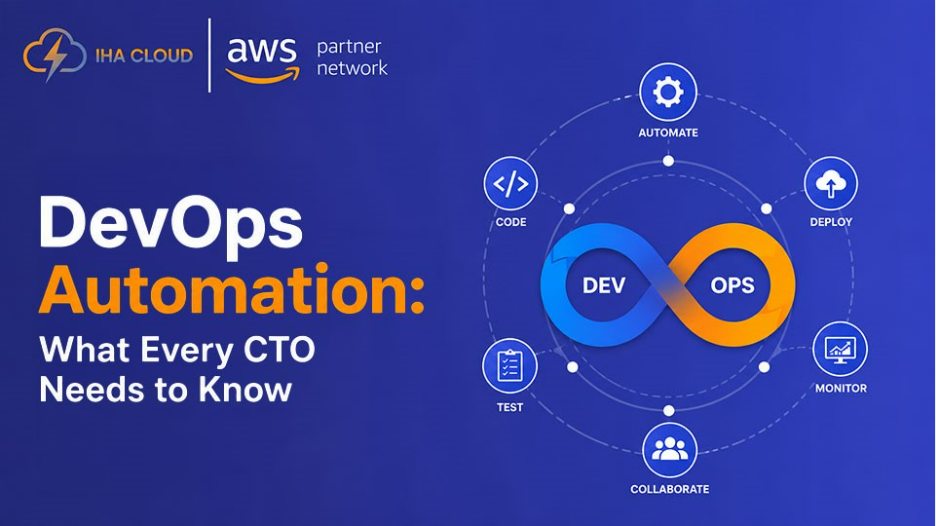
DevOps automation means using tools and workflows to handle repeatable work across software delivery, infrastructure, security, and operations.
That can include CI/CD, Infrastructure as Code, automated testing, cloud provisioning, security checks, monitoring, and automated responses to known issues.
A simple rule is worth remembering:
Don’t automate a messy process. Standardize it first.
Otherwise, you may just automate the inconsistency.
Start With the Problem, Not the Tool
It’s easy to get distracted by tools. Terraform, Kubernetes, GitHub Actions, CloudFormation—the list goes on.
But the first question shouldn’t be “Which tool should we use?”
Ask:
- How often does this task happen?
- How much engineering time does it consume?
- What happens when someone gets it wrong?
- Can the process be standardized?
- Will automation improve speed, reliability, security, or cost?
If your team manually handles 30 deployments a week, that’s a much stronger automation candidate than an architecture decision that happens twice a year.
Automate where the leverage is highest.
Where CTOs Should Look First
Make Releases Repeatable
CI/CD can automatically build code, run tests, perform security checks, and deploy approved changes.
The benefit isn’t simply faster deployment. It’s removing unnecessary handoffs and making the release process less dependent on individual engineers.
DORA research has linked continuous delivery capabilities with stronger software delivery performance and operational outcomes.
The question to ask is:
Can we release faster without making production less reliable?
Stop Building Infrastructure by Hand
Infrastructure as Code lets teams define cloud infrastructure in version-controlled configurations instead of creating environments manually.
With tools such as Terraform or AWS CloudFormation, a staging environment can be reproduced from an approved configuration instead of rebuilt from scratch.
That matters when teams grow. Infrastructure knowledge shouldn’t live inside one engineer’s head.
DORA research has identified Infrastructure as Code as an important capability associated with stronger software delivery performance.
Let Testing Keep Up With Development
Faster coding doesn’t help much if testing remains manual.
Automated unit, integration, API, regression, and security testing can catch problems before they reach production.
This matters even more as AI-assisted development becomes common. DORA’s 2025 research reports widespread workplace AI adoption and productivity gains, while warning that AI can amplify weaknesses already present in software delivery systems.
In simple terms:
If developers can produce code faster, your delivery controls need to keep up.
Automate Cloud Operations Carefully
Cloud automation can handle provisioning, scaling, backups, tagging, and recovery workflows.
For example, an AWS application can scale resources when traffic increases and reduce capacity when demand falls.
But automation isn’t automatically cost optimization. Poor scaling rules, unnecessary environments, or excessive logging can create new cloud spend.
Automate for efficiency, then measure the result.
Build Security Into the Workflow
Security shouldn’t be a final check before deployment.
Automated workflows can scan code, dependencies, containers, infrastructure configurations, secrets, and cloud permissions throughout the delivery process.
A vulnerable dependency can trigger a deployment block before it becomes a production problem.
That’s a much stronger model than asking a security team to review everything at the end.
Automate Known Problems
Monitoring becomes more useful when it can trigger a predefined response.
For a known failure, the workflow might be:
Detect → Respond → Notify → Record
An unhealthy application instance could be replaced automatically while the team is alerted.
But don’t automate decisions that require context.
Known, predictable problems are good automation candidates. Ambiguous incidents still need people.
A Simple Before-and-After
Consider a typical release.
Before:
Developer merges code → manual testing → infrastructure check → deployment → dashboard monitoring → manual rollback.
After:
Code merge → automated tests → security checks → IaC validation → deployment → health checks → predefined rollback.
The difference is more than fewer clicks.
The second process means fewer handoffs, more consistent releases, faster feedback, and less repetitive work for engineers.
That’s the kind of improvement a CTO should care about.
Where Does Your Automation Stand?
Not every company needs fully autonomous operations. A simple maturity model helps identify the next step:
1. Manual — People perform the work.
2. Scripted — Scripts reduce repetitive effort.
3. Standardized — Teams follow the same process.
4. Automated — Systems execute it.
5. Self-Service — Teams safely trigger approved workflows.
6. Policy-Driven — Automation enforces rules automatically.
The goal isn’t to reach Level 6 everywhere. A production change may still need human approval while a development environment can be fully self-service.
Don’t Create Automation Debt
Automation can create problems of its own.
Brittle pipelines, duplicate scripts, undocumented workflows, and tools that only one engineer understands can make the environment harder to manage.
So ask:
Can the team understand, maintain, and troubleshoot what we’ve automated?
If the answer is no, you’ve probably traded manual work for automation debt.
Measure What Actually Changed
Don’t measure success by how many workflows you’ve automated.
Look at:
- Deployment frequency
- Lead time
- Change failure rate
- Recovery time
- Engineering hours saved
- Production incidents
- Cloud costs
DORA metrics help measure software delivery performance, but they don’t prove that automation itself caused an improvement. Pair delivery metrics with business and operational measures to understand the actual return.
The CTO View
Good DevOps automation isn’t about having the most tools or the most automated pipelines.
It’s about giving engineers more time to solve important problems while making delivery safer and more predictable.
Start with work that is frequent, repetitive, predictable, and costly to perform manually.
Standardize it. Automate it. Measure it. Then simplify it.
That’s how automation becomes an engineering advantage rather than another layer of complexity.