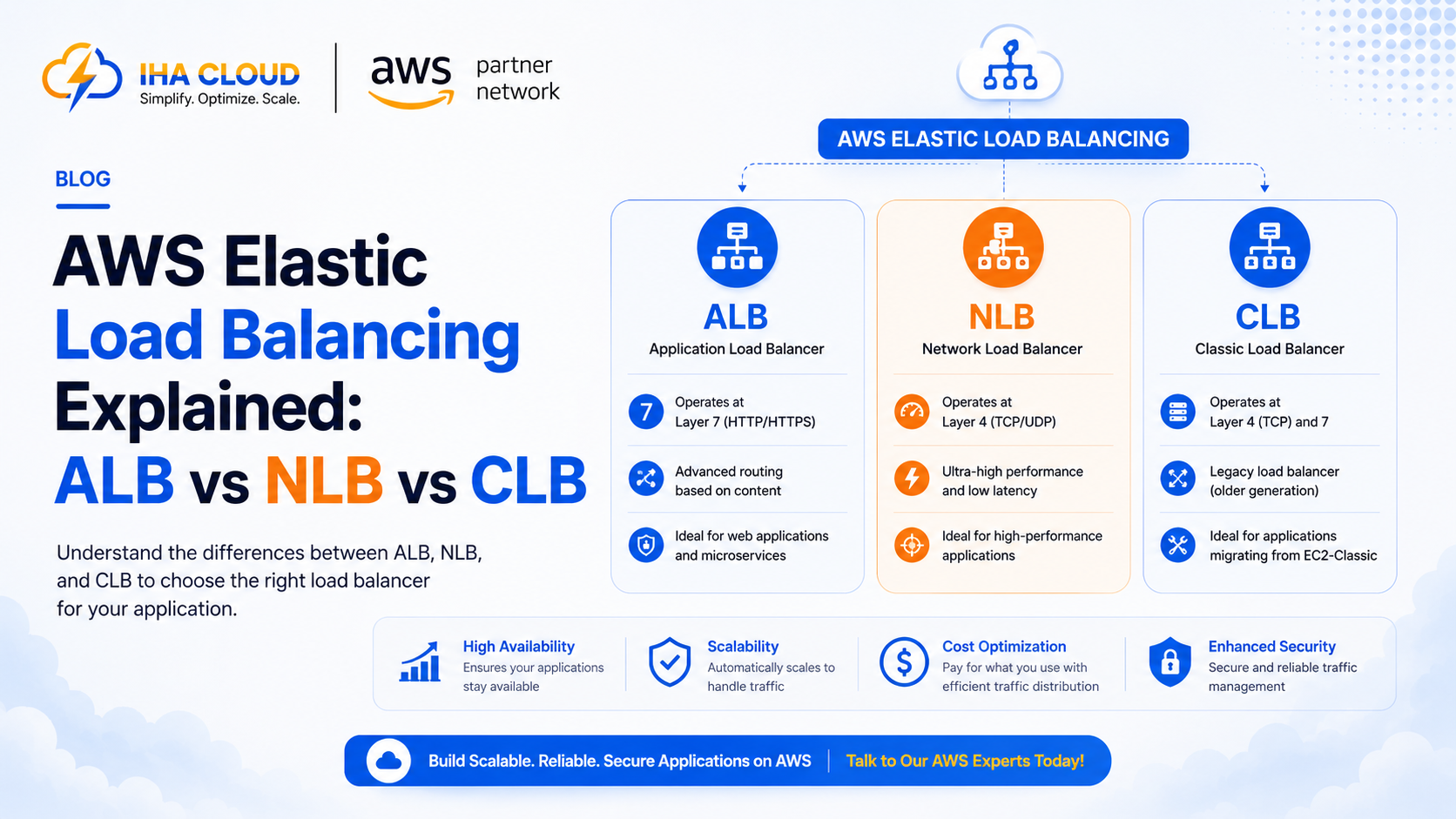
A load balancer distributes incoming traffic across multiple servers so no single instance gets overwhelmed, and so a failed instance does not take the whole application down. AWS offers three types, and the right choice depends on what layer of traffic you actually need to manage.
Application Load Balancer (ALB)
Operates at Layer 7 (HTTP/HTTPS), meaning it understands the content of requests, not just the connection.
- Routes traffic based on URL path, hostname, or HTTP headers
- Supports containerized applications running on ECS with dynamic port mapping
- Handles SSL/TLS termination, reducing load on backend instances
- The right choice for the vast majority of modern web applications and microservices
Network Load Balancer (NLB)
Operates at Layer 4 (TCP/UDP), handling raw network connections without inspecting request content.
- Handles extremely high throughput with ultra-low latency
- Preserves the client’s source IP address, which some applications require
- Best for use cases like gaming servers, IoT applications, or anything requiring static IP addresses
- Not aware of HTTP-level routing rules the way an ALB is
Classic Load Balancer (CLB)
The original AWS load balancer, largely superseded by ALB and NLB.
- Supports both Layer 4 and basic Layer 7 features, but not as well as the purpose-built options
- Mainly still seen in older applications that have not been migrated
- AWS does not recommend it for new applications — there is no scenario where CLB outperforms ALB or NLB for an equivalent use case
Choosing the Right One
- Web applications, APIs, microservices with HTTP routing needs → ALB
- High-performance, low-latency, non-HTTP traffic → NLB
- Existing legacy setup not yet migrated → CLB, but plan to move off it
Common Mistakes
- Running a Classic Load Balancer on a new application simply because it was the default years ago
- Using an ALB for a use case that genuinely needs NLB’s static IP or extreme throughput requirements
- Not configuring health checks properly, so the load balancer keeps sending traffic to unhealthy instances
- Terminating SSL at the instance level instead of the load balancer, adding unnecessary CPU overhead across every instance
For nearly all standard web applications, ALB is the correct default. NLB is a deliberate choice for a specific technical requirement, not a general-purpose upgrade.