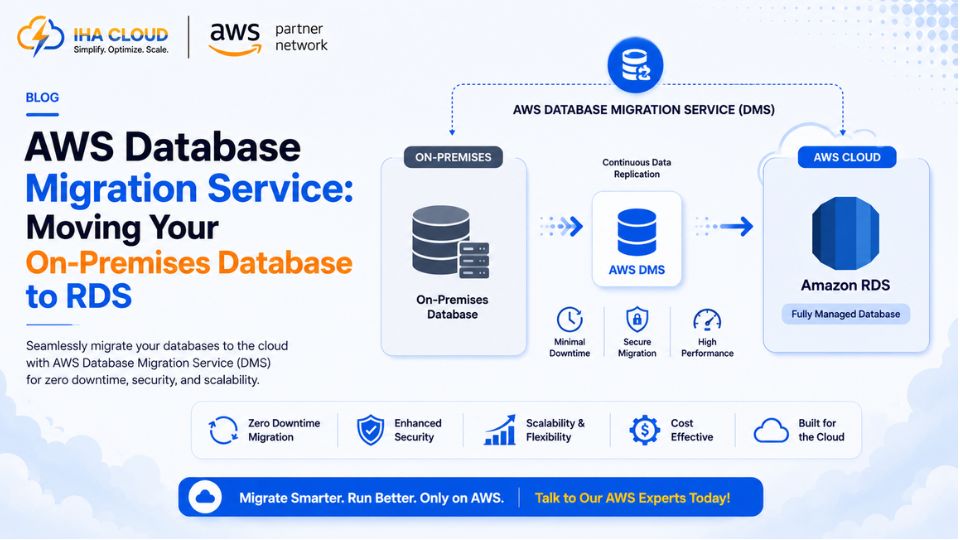
Migrating a database is not like migrating a web server — the data has to arrive intact, in the right order, with minimal or no downtime for whatever depends on it. AWS Database Migration Service (DMS) exists specifically to handle this without requiring the database to go offline for hours.
What DMS Actually Does
DMS replicates data from a source database to a target database, and can keep them in sync continuously until you are ready to cut over.
- Supports migrations between the same database engine (MySQL to MySQL) or across engines (Oracle to PostgreSQL) using the Schema Conversion Tool
- Performs an initial full load of existing data, then continues replicating ongoing changes
- Keeps the source database live and fully operational throughout the migration
The Migration Process
- Assess — use the AWS Schema Conversion Tool if migrating between different database engines, to identify what needs manual adjustment
- Set up a replication instance — a small managed EC2 instance that runs the actual migration task
- Define source and target endpoints — the connection details for your existing database and the new RDS instance
- Run the full load — DMS copies existing data to the new database
- Enable ongoing replication (CDC) — Change Data Capture keeps the target in sync with new writes to the source
- Cut over — once both databases are fully in sync, redirect the application to the new RDS endpoint
Minimizing Downtime
- Run the full load and CDC replication well in advance of the planned cutover date
- Schedule the actual cutover during the lowest-traffic window available
- Validate row counts and data integrity between source and target before cutting over
- Keep the source database available as a fallback for a defined period after cutover
Common Pitfalls
- Not accounting for schema differences when migrating between different database engines
- Underestimating the replication instance size needed for a large or high-write database
- Cutting over without validating data integrity first
- No rollback plan if something looks wrong immediately after cutover
Why This Beats a Manual Migration
A manual database migration usually means a maintenance window, a backup, a restore, and hoping nothing changed in between. DMS keeps the source live and continuously replicates changes, which turns a high-risk, all-at-once event into a controlled, verifiable process — and that difference is exactly what makes it worth using for any production database migration.