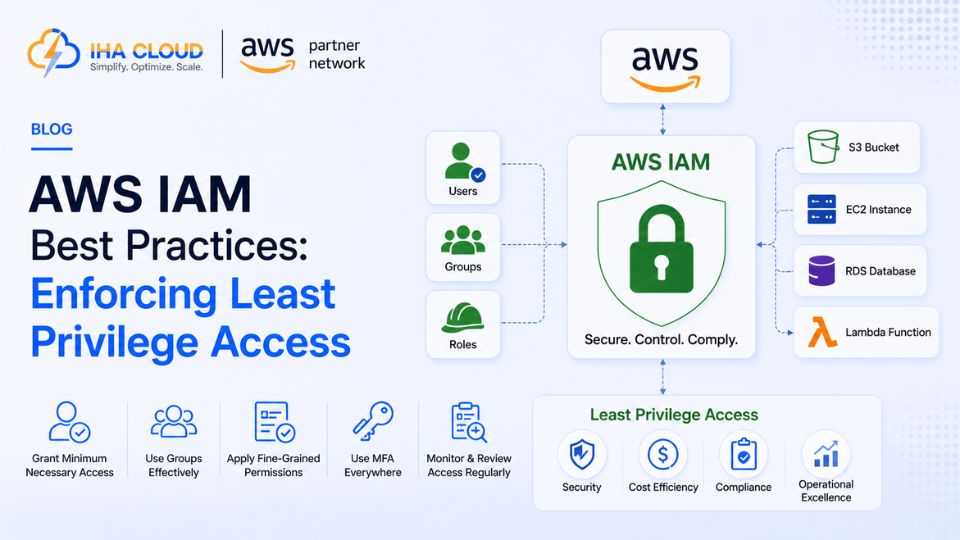
IAM (Identity and Access Management) controls who can do what inside your AWS account, and it is where most preventable security incidents actually originate. Not through sophisticated attacks, but through permissions that were broader than they needed to be.
The Principle That Matters Most
Least privilege means every user, role, and service only has the permissions it needs to do its specific job — nothing more. It sounds obvious, but most AWS accounts drift away from it over time as permissions get added for convenience and never removed.
Practical Steps to Get There
- Never use the root account for daily work — create an IAM user with administrative permissions instead, and lock the root account behind MFA
- Use IAM Roles instead of long-lived access keys wherever possible, especially for EC2 instances and Lambda functions
- Group permissions logically — attach policies to Groups or Roles, not individual users, so access is manageable at scale
- Require MFA for all users with console access, without exception
Auditing What You Already Have
- Use IAM Access Analyzer to identify roles and policies that grant more access than is actually used
- Review the IAM Credential Report regularly to find unused users, old access keys, and accounts without MFA
- Check for policies using wildcard permissions (“Action”: “*”, “Resource”: “*”) and scope them down to specific services and resources
Service-to-Service Permissions
- Give each Lambda function, ECS task, or EC2 instance its own IAM role scoped to exactly what it needs
- Avoid attaching one broad role to multiple services just because it is faster to set up
- Use resource-level permissions where AWS supports them, rather than granting access to all resources of a type
Common Mistakes
- Access keys created years ago, still active, attached to no one currently at the company
- A single “admin” role used across the entire engineering team because individual roles felt like extra work
- CI/CD pipelines running with full administrative access instead of a tightly scoped deployment role
- No process for removing access when someone leaves the team or changes roles
Why This Matters More Than It Seems
A misconfigured security group or an unpatched server is a specific, fixable problem. An IAM role with excessive permissions is a standing risk that sits quietly until something goes wrong — and when it does, the blast radius is defined by exactly how much access that role had. Reviewing IAM permissions is not a one-time setup task; it is something that needs revisiting as the account and team grow.