You’ve just launched your web app. The code is clean, the design looks great, and you’re proud of it. You share the link with a friend in Sydney, Australia. They click it. And then… they wait. And wait. The page finally loads — slowly, images dragging in one by one — and your friend quietly wonders if your app is actually finished.
Meanwhile, your users in New York? Totally fine.
This is the classic problem of geographic latency — and it’s exactly what AWS CloudFront was built to solve.
So, What Is AWS CloudFront?
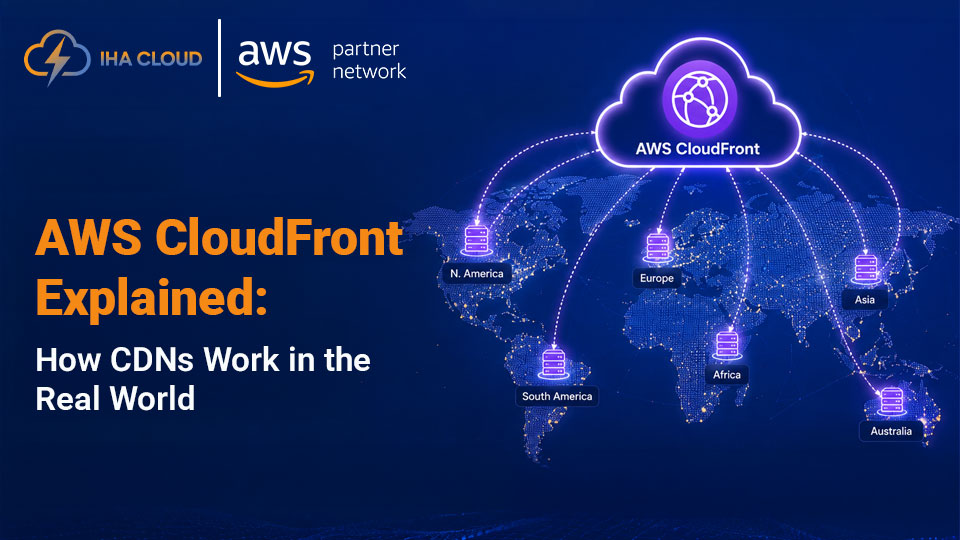
AWS CloudFront is Amazon’s Content Delivery Network (CDN). In plain terms, it’s a global system of servers that stores copies of your content — images, videos, HTML files, JavaScript, APIs — closer to your users, so they don’t have to travel halfway around the world just to load your homepage.
It sits between your users and your origin server (which could be an S3 bucket, an EC2 instance, an Application Load Balancer, or even a custom server on-premises). When someone requests your content, CloudFront serves it from the nearest location it can — reducing latency, cutting load on your origin, and making the whole experience feel snappier.
Think of it like a chain of mini warehouses spread across the globe. Instead of shipping everything from one factory (your origin), you stock popular items in local warehouses (edge locations) so delivery is faster. Amazon built this infrastructure at a massive scale, and CloudFront plugs you into it.
The Core Concepts You Need to Understand
Before we get into setup, let’s make sure the vocabulary makes sense. These are the terms you’ll keep running into.
Edge Locations
These are CloudFront’s physical data centers scattered around the world. As of 2025, CloudFront has over 450 points of presence across 90+ cities in 47 countries. When a user in Mumbai requests your site, CloudFront routes that request to the nearest edge location — probably in Mumbai or Chennai — rather than all the way back to your server in us-east-1.
Origin
Your origin is where your actual content lives. It could be:
- An S3 bucket (for static assets like images, CSS, JS)
- An EC2 instance or ECS container (for dynamic content)
- An Application Load Balancer
- An API Gateway
- A custom HTTP server anywhere on the internet
CloudFront doesn’t replace your origin — it sits in front of it.
Distribution
A CloudFront distribution is basically your CDN configuration. You set one up per domain (or use one for multiple), define your origins, set caching rules, and configure behaviors. It’s the control plane for how CloudFront handles requests.
Cache Behavior
This is where you define how CloudFront caches different types of content. You might cache your static images for 30 days, but never cache your API responses. Cache behaviors let you define these rules per URL path pattern.
TTL (Time to Live)
TTL is how long CloudFront keeps a cached copy before checking back with your origin for a fresh version. Set it too low and you defeat the purpose of caching. Set it too high and users might see stale content. Finding the right balance is one of the key skills of working with CloudFront effectively.
How a CloudFront Request Actually Works
Here’s what happens behind the scenes when someone visits your CloudFront-powered site:
- User makes a request — their browser asks for
https://yoursite.com/logo.png - DNS routes to the nearest edge — CloudFront’s Anycast routing sends the request to the closest edge location
- Cache check — the edge location checks if it has a fresh copy of
logo.png - Cache HIT — if yes, it immediately returns the file to the user. Fast. Done.
- Cache MISS — if no (or if the TTL has expired), the edge location fetches it from your origin, caches it locally, then serves it to the user
- Next request — now the edge has it cached, so the next user in that region gets a cache HIT
That’s the fundamental loop. The first request for any piece of content in any region will always hit your origin. Every subsequent request until the cache expires is served from the edge.
Why Does CloudFront Actually Matter?
CDNs feel like an infrastructure detail — the kind of thing you “deal with later.” But here’s why that thinking can hurt you:
1. Speed Is a Product Feature
Studies consistently show that page load time directly affects user behavior. A one-second delay in load time can reduce conversions by up to 7%. Mobile users on slower connections are even more sensitive. If your users are global, a CDN isn’t optional — it’s a necessity.
2. It Protects Your Origin
Every request that hits your CDN instead of your origin is one less request your servers need to handle. During traffic spikes — say, you go viral or run a big promotion — CloudFront absorbs the surge. Without it, your origin can buckle under the load.
3. Built-In Security
CloudFront integrates deeply with AWS’s security stack:
- AWS Shield Standard is included by default, giving you always-on DDoS protection
- AWS WAF (Web Application Firewall) can be attached to filter malicious traffic before it ever reaches your origin
- SSL/TLS termination happens at the edge, so you get HTTPS for free with AWS Certificate Manager
- Geo-restriction lets you block or allow content based on the user’s country
4. Cost Savings
Serving content from the edge is cheaper than serving it from your origin — especially if your origin is EC2. You pay for CloudFront data transfer, but AWS charges less per GB through CloudFront than direct EC2 egress in many cases. And since fewer requests hit your origin, your compute costs drop too.
5. It Plays Well With the Rest of AWS
If you’re already using S3, EC2, API Gateway, or Lambda@Edge, CloudFront plugs in almost seamlessly. The integrations are native, the IAM permissions are familiar, and the monitoring flows right into CloudWatch.
Lambda@Edge and CloudFront Functions: Going Beyond Simple Caching
Here’s where CloudFront gets genuinely interesting for developers.
Lambda@Edge
Lambda@Edge lets you run serverless functions at CloudFront’s edge locations — not in a central AWS region. This means you can execute code closer to your users without managing servers. Common use cases include:
- A/B testing — randomly assign users to different variants at the edge
- Authentication — validate JWT tokens before the request hits your origin
- URL rewrites and redirects — transform request paths dynamically
- Personalization — serve different content based on device type, language, or geolocation headers
The latency savings are real. Code running 20ms from your user is fundamentally different from code running 200ms away.
CloudFront Functions
Launched in 2021, CloudFront Functions are a lighter-weight alternative to Lambda@Edge. They run at the edge for simpler operations — URL normalization, header manipulation, cache key customization — and are significantly cheaper and faster to execute. If you don’t need the full power of Lambda, reach for CloudFront Functions first.
How to Get Started with CloudFront
Enough theory. Let’s walk through setting up a basic CloudFront distribution for an S3-hosted static site. This is the most common starting point.
Step 1: Have an S3 Bucket Ready
If you don’t already have one, create an S3 bucket with your static site files (HTML, CSS, JS, images). Make sure static website hosting is enabled in the bucket properties.
Step 2: Open CloudFront in the AWS Console
Go to the AWS Management Console → search for CloudFront → click Create Distribution.
Step 3: Configure Your Origin
- Origin domain: Select your S3 bucket from the dropdown (or enter your custom origin URL)
- Origin access: If using S3, choose Origin Access Control (OAC) — this is the recommended approach that keeps your S3 bucket private and only accessible via CloudFront
- CloudFront will prompt you to update your S3 bucket policy — do it
Step 4: Set Default Cache Behavior
- Viewer protocol policy: Choose Redirect HTTP to HTTPS — always
- Cache policy: Start with
CachingOptimizedfor static content - Compress objects automatically: Enable this — it’s free gzip/brotli compression
Step 5: Configure Distribution Settings
- Price class: Choose based on your audience. “Use all edge locations” gives best performance but costs more. “Use only North America and Europe” is cheaper if your users are primarily there.
- Alternate domain names (CNAMEs): Add your custom domain (e.g.,
www.yoursite.com) - SSL certificate: Request a free certificate via AWS Certificate Manager (ACM) — must be in us-east-1 for CloudFront
- Default root object: Set this to
index.html
Step 6: Create the Distribution
Click Create Distribution. CloudFront will take a few minutes to deploy to all edge locations globally. You’ll see a status of “Deploying” — once it flips to “Enabled,” you’re live.
Step 7: Point Your DNS to CloudFront
In Route 53 (or your DNS provider), create an A record with an alias pointing to your CloudFront distribution domain (something like d1234abcd.cloudfront.net).
That’s it. Your static site is now globally distributed.
Common Mistakes to Avoid
A few things that catch people off guard:
Setting TTL too high for HTML files — If you cache your index.html for 30 days and deploy a new version, users won’t see it until the cache expires. Keep HTML TTLs short (minutes, not days) and use long TTLs only for versioned assets (files with hashes in their names like app.a3f92b.js).
Forgetting cache invalidation costs money — CloudFront charges for invalidations after the first 1,000 per month. Instead of invalidating, use cache-busting via versioned filenames. This is a much better pattern for CI/CD pipelines.
Not enabling compression — It’s a checkbox. Enable it. It can reduce file sizes by 60–80% and costs nothing extra.
Ignoring CloudFront logs — CloudFront can log every request to S3. This is invaluable for debugging cache behavior, spotting errors, and understanding your traffic patterns. Enable it from day one.
Using the wrong origin protocol — Make sure CloudFront talks to your origin over HTTPS (not HTTP) if possible. This protects the traffic between CloudFront’s edge and your origin server.
Pricing: What Will This Actually Cost?
CloudFront pricing has a few components:
- Data transfer out — charged per GB, varies by region (roughly $0.0085 to $0.17 per GB depending on location)
- HTTP requests — charged per 10,000 requests (around $0.0075 to $0.016 depending on type)
- Invalidations — first 1,000 per month free, then $0.005 per path
- Lambda@Edge — charged per request and duration, like standard Lambda
The good news: CloudFront has a generous free tier — 1 TB of data transfer and 10 million HTTP/HTTPS requests per month, free for 12 months with a new AWS account.
For most small to medium applications, CloudFront costs are surprisingly low — often under $10–20/month. At scale, you’ll want to model it out, but the performance and resilience benefits almost always justify the cost.
Is CloudFront Right for Every Use Case?
Mostly yes — but with nuance.
CloudFront shines for:
- Static websites and JAMstack apps
- Media-heavy sites (images, video streaming)
- APIs with cacheable responses
- Any globally distributed application
It’s less useful for:
- Highly dynamic content with zero cacheability (though you can still use it for the security and routing benefits)
- Very low-traffic internal tools where latency isn’t a concern
- Applications with strict data residency requirements in regions CloudFront doesn’t cover well
Wrapping Up
AWS CloudFront is one of those services that quietly does a lot of heavy lifting. Once it’s set up, you stop thinking about it — your content just loads fast, DDoS attacks get absorbed, and your origin server breathes easy. That’s the magic of a well-configured CDN.
If you’re building anything on AWS that users access over the internet, CloudFront should be part of your architecture. The setup is straightforward, the pricing is reasonable, and the performance difference — especially for global audiences — is real and measurable.
Start simple: put CloudFront in front of an S3 bucket. Get comfortable with distributions, cache behaviors, and TTLs. Then explore Lambda@Edge when you’re ready to add logic at the edge. The rabbit hole goes deep, but the entry point is genuinely accessible.
Frequently Asked Questions
AWS CloudFront is a CDN (Content Delivery Network) service that helps deliver websites, videos, APIs, and static content faster using global edge locations.
AWS CloudFront offers a free tier with limited data transfer and requests. After that, pricing depends on bandwidth usage, requests, and geographic regions.
CloudFront caches website content at edge servers located near users, reducing latency and improving page load times worldwide.
Yes, AWS CloudFront includes security features like SSL/TLS encryption, AWS Shield for DDoS protection, signed URLs, and integration with AWS WAF.
You can set up AWS CloudFront by creating a distribution, selecting an origin server, configuring cache behavior, enabling SSL, and updating your DNS settings.